Star history
GitHub star-history charts from privacy-safe weekly counts, hosted as SVG or PNG or generated by a GitHub Action.
Chart any public repository with GitHub's privacy-safe star history endpoint. Hosted star charts work again at their original URLs. No repository admin access is required.
GET/chart/github/stars/:owner/:repo.svg
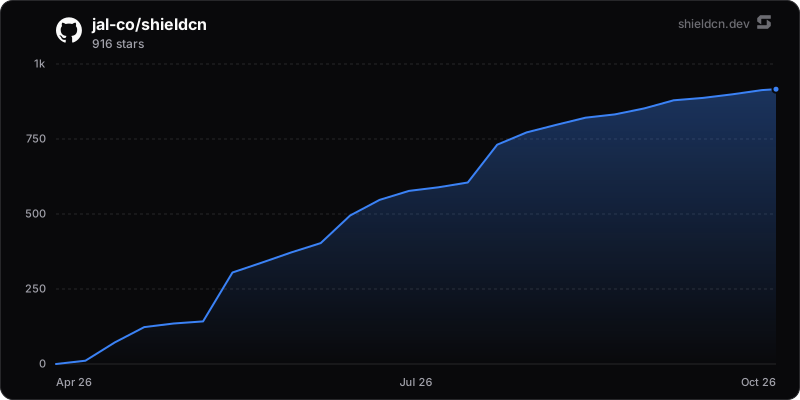

Hosted charts
/chart/github/stars/{owner}/{repo}.svg
/chart/github/stars/{owner}/{repo}.png
/chart/github/stars/{owner}/{repo}.json
The shorter /chart/stars/{owner}/{repo} alias supports the same formats.
Use the chart query parameters to change colors,
dimensions, title, and axes.
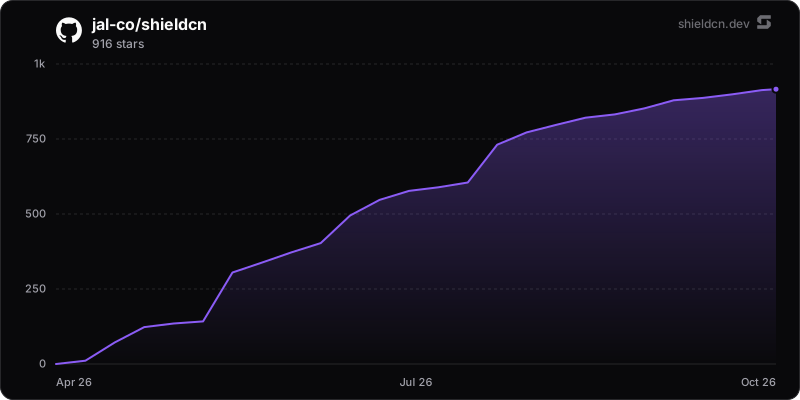GitHub Action
Use the shieldcn starchart action if you prefer to commit SVG files to your repository. It fetches the same weekly history and writes a light/dark pair.
Quick start
Add a workflow that runs the action on a daily cron. The action writes a
dark/light SVG pair and opens a PR. PR mode needs
contents: write and pull-requests: write.
# .github/workflows/star-chart.yml
name: Star chart

on:
  schedule:
    - cron: "0 6 * * *"
  workflow_dispatch:

permissions:
  contents: write
  pull-requests: write

jobs:
  star-chart:
    runs-on: ubuntu-latest
    steps:
      - uses: actions/checkout@v4
      - uses: jal-co/shieldcn@v1
        with:
          theme: violet
          pull-request: true
Then embed the generated pair in your README. GitHub swaps the image with the viewer's color scheme:
<picture>
  <source media="(prefers-color-scheme: dark)" srcset=".github/shieldcn/star-chart-dark.svg">
  <img alt="Star history" src=".github/shieldcn/star-chart-light.svg">
</picture>
The exact snippet for your configuration is also exposed as the snippet
output, and the workflow summary prints it after each run.
Pull requests and protected branches
Set pull-request: true to open a PR against the workflow repository's default
branch. The action updates chore/shieldcn-star-chart and reuses its open PR on
later runs. Only the generated chart files are committed. It never force-pushes
or pushes directly to the default branch in this mode.
Grant contents: write and pull-requests: write, and enable Allow GitHub
Actions to create and approve pull requests in the repository's Actions
settings. The action creates PRs but does not approve them or request reviewers.
pull-request defaults to false, preserving direct commits. commit: false
writes files only, even with PR mode enabled. The pull-request-url output
contains the existing or newly created PR URL. An unchanged chart creates no commit.
The repo input selects the chart's data source; the PR always targets
GITHUB_REPOSITORY, the repository running the workflow.
PRs created with GITHUB_TOKEN do not trigger ordinary push or pull-request
workflows. If required checks must run automatically, pass a GitHub App token
or personal access token through the existing token input. PR mode removes
[skip ci] from the default commit message; custom messages are left unchanged.
Use a workflow concurrency group to prevent overlapping runs from updating the
same chart branch. Keep chore/shieldcn-star-chart reserved for this action.
After its PR is merged or closed, the next update starts from the latest default
branch content and preserves branch ancestry without a force push.
Inputs
All chart styling matches the chart query parameters, passed as action inputs instead of a URL.
| Input | Default | Description |
|---|---|---|
repo | current repo | Repository to chart, as owner/repo |
token | github.token | GitHub API token; private repositories require metadata read access |
output | .github/shieldcn/star-chart.svg | Output path; mode: both inserts -dark/-light before .svg |
mode | both | dark, light, or both |
theme | — | Accent theme (zinc, slate, blue, green, rose, orange, violet, purple, cyan, emerald) |
color | — | Explicit accent hex without #, wins over theme |
background | mode surface | transparent or a hex color without # |
border | true | Draw the rounded card border |
area | true | Show the gradient area fill under the line |
width / height | 800 / 400 | Chart size in px |
title / subtitle | owner/repo / star count | Card text |
font | inter | Font stack keyword, same as badges |
logo | true | Show the shieldcn corner watermark |
commit | true | Commit and push the chart as shieldcn[bot] |
pull-request | false | Open or update a chart PR instead of pushing directly; requires commit: true |
commit-message | chore: update star chart [skip ci] | Commit message |
Outputs
Use the outputs to wire the chart into follow-up steps, for example a job summary or a README updater.
| Output | Description |
|---|---|
files | Newline-separated list of written SVG paths |
stars | Total stars reported by the history endpoint |
snippet | Ready-to-paste README embed (a <picture> pair when mode is both) |
pull-request-url | Chart PR URL, or empty when no PR is needed or PR mode is disabled |
committed | Whether a commit was pushed (true/false) |
Charting another repository
Set repo to any public repository. For a private repository, supply a token
with metadata read access to that repository.
- uses: jal-co/shieldcn@v1
  with:
    repo: vercel/next.js
How it works
GitHub returns weekly star counts, newest first, with up to 30 weeks per page. shieldcn fetches every page, reverses the weeks, and accumulates the counts from zero. It samples the completed curve down to at most 30 points, including the first and last points. Each weekly point sits at the end of its bucket; the current week's point uses the request time.
The chart and JSON total use the counts reported by the history endpoint.
They do not reconstruct individual stargazer timestamps or add a separate live
count. GitHub's week boundaries are not guaranteed to align with UTC.
An incomplete or invalid response does not replace a cached successful chart.
Data source
GitHub repository star history API,
GET /repos/{owner}/{repo}/stargazers/history, API version 2026-03-10.
Public repositories support unauthenticated reads. Hosted requests use the
token pool when available, with a 6-hour fresh cache and a
30-day last-known-good fallback. The GitHub Action calls GitHub directly with
the workflow token and does not use shieldcn's hosted cache.