Charts
Shadcn-styled graphs for GitHub stars, issues, lifetime commit history, npm downloads, and your own JSON data — rendered as portable SVGs.
Shadcn-styled line/area charts you can drop in a README, docs site, or anywhere an image works — plain SVG, no JavaScript, no iframe. Five kinds: GitHub star history, issues over time, lifetime commit history (a homage to commit-history), npm downloads, and arbitrary JSON.
Star history charts use GitHub's privacy-safe weekly counts and work for any public repository.
Builder
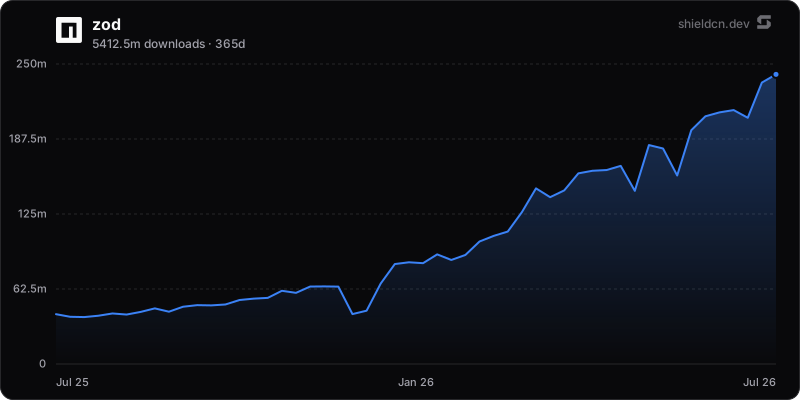
Pick a chart kind, tweak the styling, and copy the URL or markdown.
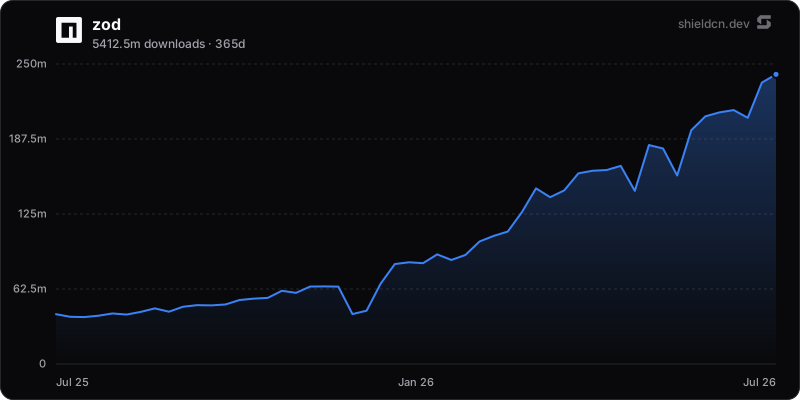
GET/chart/npm/:package.svg

URL format
/chart/github/issues/{owner}/{repo}.svg    → GitHub issues over time
/chart/github/commits/{user}.svg            → lifetime commit history
/chart/github/commits/{user1},{user2}.svg   → compare users
/chart/npm/{package}.svg                    → npm weekly downloads
/chart/json.svg?values=1,2,3                → inline JSON data
/chart/json.svg?url=...&query=...           → remote JSON data
Every endpoint also serves .png and .json (the raw time series).
Use it in markdown:
Or as a clickable image linking back to the package:
[](https://www.npmjs.com/package/zod)GitHub issues over time
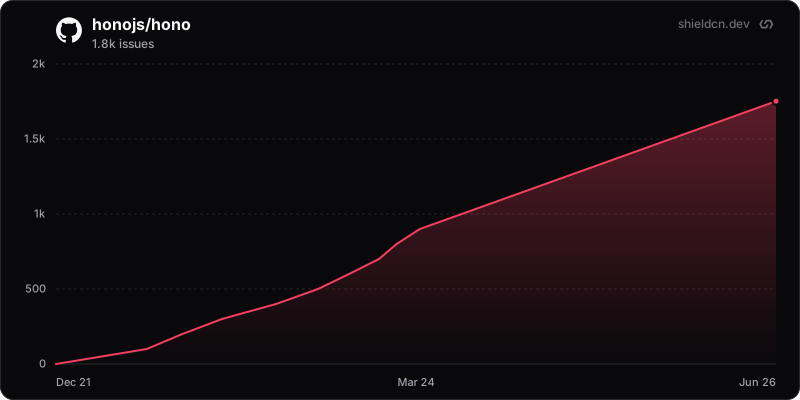
Cumulative issues opened, sampled from the GitHub search API (pull requests excluded).
/chart/github/issues/{owner}/{repo}.svgIssues opened over time
GitHub commits over time
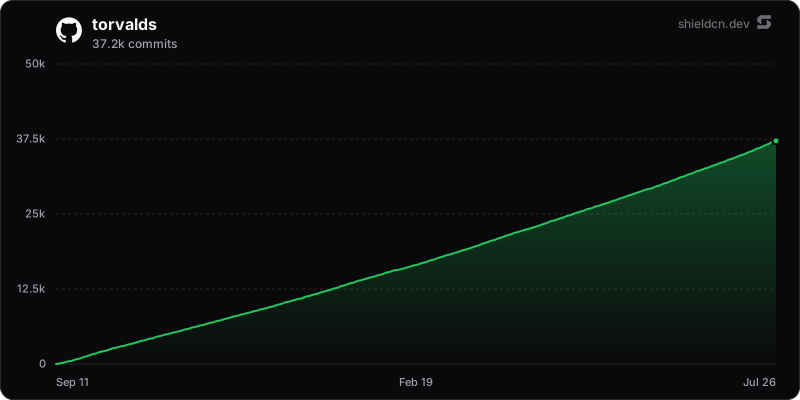
A whole coding career as one rising curve — every public commit since the account was born, accumulated month by month (the same data as the green contribution graph, not the noisy issues/PRs calendar). This is a loving homage to commit-history by Peet von Zweigbergk — "a star-history, but for commits".
/chart/github/commits/{user}.svgLifetime public commits, accumulated month by month
Compare users
Pass comma-separated logins to race several trajectories on one chart.
/chart/github/commits/{user1},{user2},{user3}.svgComma-separated logins compare users on one chart
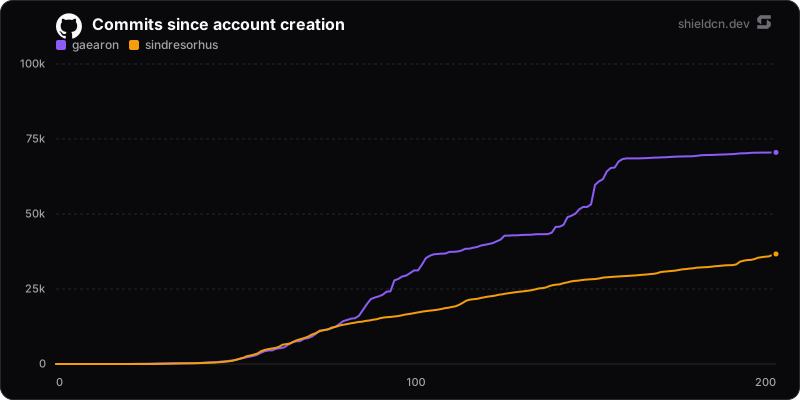
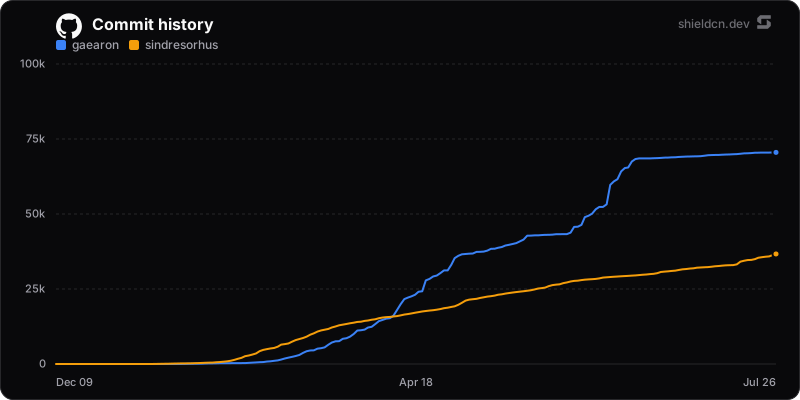Add ?align=true for aligned mode — every user lines up at "month zero"
(their own account birth) regardless of when they actually joined, so you're
comparing trajectories rather than calendar dates.
Aligned mode — everyone starts at their own month zero
npm downloads
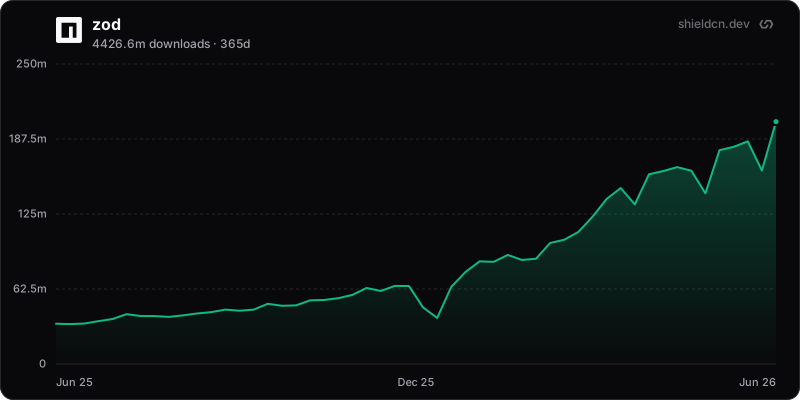
Weekly download buckets over the last year (configurable with ?days=).
/chart/npm/{package}.svg
/chart/npm/@scope/{package}.svg
Weekly npm downloads
Your own data (JSON)
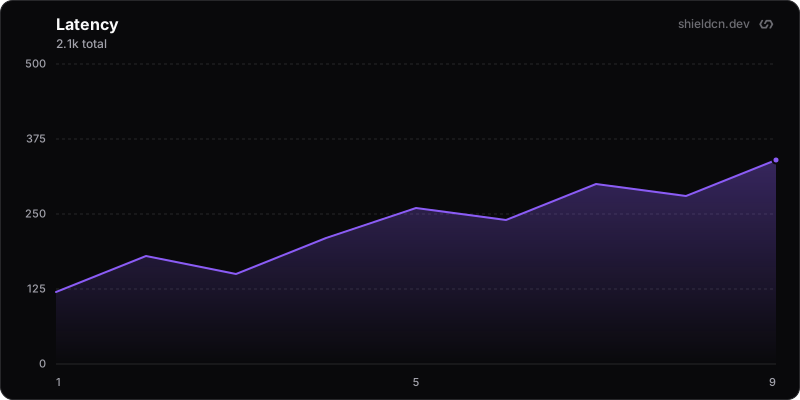
Bring numbers inline with ?values= (comma-separated). Add ?dates= for a
time axis or ?labels= for category ticks — omit both and points are spaced
evenly and labelled 1, 2, 3, ….
/chart/json.svg?values=120,180,150,210,260&title=Latency&label=ms
/chart/json.svg?values=10,20,30&dates=2024-01-01,2024-02-01,2024-03-01
Inline values, evenly spaced index axis
Or pull from a remote endpoint with JSONPath,
exactly like the dynamic JSON badge. query
selects the value array; optional dateQuery selects a parallel date array.
/chart/json.svg?url=https://api.example.com/metrics.json&query=$.points[*].count&dateQuery=$.points[*].dateQuery parameters
| Param | Values | Default | Description |
|---|---|---|---|
mode | dark, light | dark | Surface and text colors |
theme | blue, green, rose, orange, violet, purple, cyan, emerald, … | — | Accent color from the shadcn palette |
color | hex (no #) | 3b82f6 | Line + end-dot color (wins over theme) |
fill | hex (no #) | line color | Area fill color, independent of the line |
area | true, false | true | Show the gradient area fill under the line |
bg / background | transparent, hex | mode surface | Card background |
border | true, false | true | Draw the rounded card border |
font | inter, geist, geist-mono, jetbrains-mono, fira-code, roboto, space-grotesk | inter | Font-family stack (same keywords as badges) |
logo | false | shown | Show/hide the shieldcn corner watermark |
logoColor | hex (no #) | muted | Watermark color |
icon | SimpleIcons slug, ri:Name, false | auto (github/npm) | Icon left of the title |
iconColor | hex (no #) | title color | Title icon color |
yScale | linear, log | linear | Y-axis scale type |
yMin | number | 0 (auto) | Force the y-axis minimum |
yMax | number | auto | Force the y-axis maximum |
yTicks | 1–10 | 4 | Number of y-axis gridline intervals |
xTicks | 2–12 | 3 | Number of x-axis labels |
width | 200–2000 | 800 | Chart width in px |
height | 120–1200 | 400 | Chart height in px |
title | string | per kind | Override the chart title |
align | true, false | false | Commit charts: line users up at their account birth (month zero) |
days | 30–540 | 365 | npm download window |
values | comma numbers | — | Inline JSON data points |
dates | comma dates | — | Inline JSON x-axis dates |
labels | comma strings | — | Inline JSON x-axis labels |
url + query | URL + JSONPath | — | Remote JSON data source |
Note —
fontonly swaps the family stack. Charts are raw SVG (needed for the line paths), and a sandboxed<img>SVG can't load embedded fonts — so the rendered typeface depends on what's available to the viewer.
GitHub star history
/chart/github/stars/{owner}/{repo}.svg and /chart/stars/{owner}/{repo}.svg
render cumulative star history from GitHub's weekly counts. PNG and JSON
formats work at the same paths. These URLs render charts again after GitHub
introduced its privacy-safe history endpoint in September 2026.
See star history for the builder, API details, and an optional GitHub Action that commits charts to your repository.
How commit history works
The commit curve is a homage to commit-history,
and works the same way it does. GitHub's GraphQL
user.contributionsCollection.totalCommitContributions returns the public
commit count for a window of at most a year, so a lifetime is sliced into
monthly windows — batched a year at a time into aliased queries — then the
counts are accumulated into the rising curve. Only public commits are counted.
Requests go through the donated token pool
with a 6-hour fresh window and a 30-day last-known-good fallback.
Data sources
| Chart | Source | Cache |
|---|---|---|
| Stars | GitHub star history API | 6h fresh · 30d last-known-good |
| Issues | GitHub Search API (type:issue) | 6h fresh · 30d last-known-good |
| Commits | GitHub GraphQL API (contributionsCollection) | 6h fresh · 30d last-known-good |
| npm | npm downloads API | 1h |
| JSON | inline, or your url | 5m (remote) |
GitHub requests are distributed across the donated token pool and serve a last-known-good copy if the upstream is briefly unavailable.